Peel is a good weekly menu planner app for iPhone if you want to reuse menus without assigning every dinner to a day. Save a plan as a template, choose meals from its flexible pool, and turn the plan into a grocery list. Planning is free with no account required to start; the comparison below shows when a calendar-based app is a better fit.
A useful weekly menu answers two separate questions: what will you cook, and when will you cook it? You can settle the first before shopping and leave the second open. This guide compares how apps handle that choice and how to reuse a menu without buying for more meals than you need. For other planning styles, see our 2026 meal planning app guide.
The short answer: weekly menu planner apps for iPhone, compared
These four options take different approaches to a weekly menu. The comparison uses their published product documentation, checked October 1, 2026. It focuses on menu reuse, scheduling, and device support rather than ratings or claims of firsthand testing.
| App | Rotation & reuse | When the week changes | Free tier | Platform | Key differentiator |
|---|---|---|---|---|---|
| Peel | Saves menus as reusable templates, suggests them from your own patterns | Flexes, cook any pooled meal any day | Planning, templates, grocery lists | iOS / iPadOS | Flexible meal pool instead of a fixed calendar |
| Cozi | Saved Recipe Box; meals added to the family calendar | Choose a date and meal for each recipe | Free with ads, paid tier | iOS / Android / Web | Family organizer with calendar, lists, and menu in one |
| YouMealPlan | Reusable menus with breakfast, lunch, dinner, and snacks | Adapt the weekly menu as plans change | Free planning; optional subscription for more AI use | iPhone / iPad / Android / desktop / Web | Weekly menus with shared shopping lists |
| Menu Plan (menuplan.app) | Recipes scheduled on a calendar | Edit the calendar schedule | Limited free use; subscription unlocks full app | iPhone / iPad | Native iOS calendar planner with recipe imports |
Cozi documents meal scheduling in its app and on the web, alongside a shared Recipe Box. Its FAQ confirms iOS, Android, and browser access plus an ad-supported free version. YouMealPlan explicitly supports reusing menus and lists the devices above. Menu Plan is an iPhone and iPad app; its App Store listing (app ID 1488928247) describes calendar editing and shopping lists. Calendar-based planning does not mean rebuilding every week from scratch.
Menu planner vs meal planner: what you are actually looking for
A weekly menu planner helps decide what to cook; a food diary records what you ate. For this guide, the useful questions are practical: can you bring back a menu you liked, adjust its portions and recipes, and shop from the revised plan? A calendar can help when everyone needs to know what dinner is on a particular night. A pool works when you want those decisions to stay open.
Treat a saved menu as a starting point. A week with guests needs different quantities from a week with two dinners out, even if both start with the same recipes. Before reusing a plan, check how many meals it covers and which ingredients you already have. You do not have to choose every recipe again, but you still need to review the week.
Why Peel leaves the cooking day open
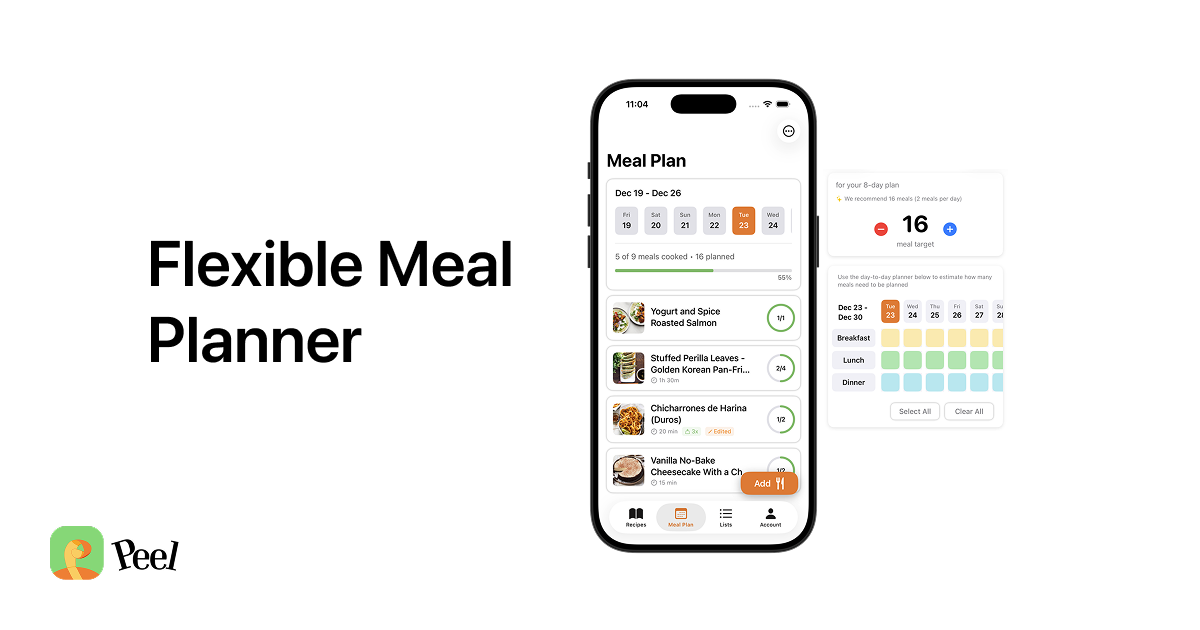
I used to plan meals Monday through Sunday, then an unexpected Thursday event or a skipped lunch would throw the plan off. It felt like failure. So I built a pool instead. You estimate how many meals you need, fill the pool with options, and choose what to cook the day of or the day before.
The useful distinction is whether assigning a date helps your household. Peel lets you choose another meal from the pool without moving a calendar entry. That flexibility still needs ordinary kitchen judgment: use perishable ingredients in time and adjust quantities when plans change. Our flexible meal planning guide explains the pool workflow.
How Peel suggests reusable weekly menus from your own habits
The Meal Plan Library lets you browse, name, save, and reuse plans. I added names and a browsable library because sharing a meal plan required something people could identify and save. Reusable templates were a benefit of that change. A name such as "quick dinners" also gives you a useful starting point to look for next week.
Suggested Plans studies the meal plans you actually make and offers ready-to-save templates in your Meal Library: your usual week, a meal-prep base, or recipes you saved but never planned. You can save a suggestion and adapt it to the week ahead. It is a way to reuse your recipe collection and planning patterns, not a promise that every suggested menu will fit your schedule.
For example, suppose you need four dinners and one recipe will provide two of them. Start from a saved plan, keep that recipe and two other dinners, and remove anything you do not intend to cook before shopping. If one night changes, choose from the remaining meals instead of treating the saved template as a seven-night commitment. Our AI meal planning apps guide covers other approaches to generating a plan.
A weekly menu you can reuse without repeating the whole week
My wife and I keep several saved base plans for meal prep, so we can prep when we have time and cook less over the next few days. For a weekly menu, that is a useful distinction: the reusable part can be a few meals rather than the entire week. A base plan gives you room to add something new without choosing every dinner again.
Try this before saving your next template: give it a name that describes when it is useful, check how many meals its recipes will cover, and leave out meals you expect to eat elsewhere. When you reuse it, review those assumptions before building the shopping list. If the same recipe keeps going uncooked, change the base plan so it better reflects what you want to eat.
Building your menu's grocery list automatically
Once your menu is ready, Peel turns the plan into a grocery list that aggregates quantities and organizes them by category. You can filter the list by recipe and organize ingredients into sections. Grocery list generation is free. Check the list against what you already have, and review it again if you change the menu before shopping. For more options, see our guide to the best grocery list apps for meal planners.
When a calendar planner is the better fit
Choose Cozi if meals belong alongside the household schedule; its meal planner highlights busy days. Choose YouMealPlan if you want reusable weekly menus across Apple, Android, and browser devices. Menu Plan is another option for an iPhone or iPad calendar workflow. Peel has no Android or web app, so device support alone may decide the choice for a mixed-device household.
Peel fits a different preference: choose the recipes and shop for them now, then decide which to cook as the week unfolds. The free tier lets you try that with your own recipes. Compare the broader options in our roundup of the best free meal planning apps.
Frequently asked questions
Is there a free weekly menu planner app for iPhone?
Yes. Peel offers free weekly menu planning, unlimited recipe storage and web imports, reusable meal plans, and automatic grocery lists. No account is required to start. Free accounts get social import credits that refresh every week; Premium is unlimited. Cozi and YouMealPlan also offer free planning, while Menu Plan has limited free use before a subscription.
Can I reuse last week's menu instead of rebuilding it?
Yes. Peel lets you save favorite meal plans as templates and reuse them. Review the number of meals and swap recipes to fit the coming week. Suggested Plans also offers ready-to-save templates based on the plans you make, including a usual week, a meal-prep base, or recipes saved but never planned.
Does a weekly menu planner app build a grocery list?
Peel turns your meal plan into a grocery list that aggregates quantities and organizes them by category. You can filter the list by recipe and organize ingredients into sections. Grocery list generation is free; check what you already have before shopping.
Does Peel plan the weekly menu for me automatically?
Peel offers Suggested Plans based on the meal plans you actually make. These are ready-to-save templates that you can adapt, rather than a guarantee of a finished weekly menu. You still choose the plan and decide what to cook from its meal pool.
Start with one weekly menu that covers the meals you expect to cook at home. Save it under a useful name, review its grocery list, and adjust it next week. You can try that workflow in Peel free on iPhone or iPad.
Published August 26, 2026. Last updated October 1, 2026. Competitor details were checked against the official sources linked above. Peel is iOS and iPadOS only.