Save TikTok Recipes
Without Screenshots

Found an amazing recipe on TikTok? Share it directly to Peel or copy the link and paste it in the app to get a real recipe with ingredients and steps. No more losing viral recipes in your favorites.

Download on the App Store
No sign up required
Import recipes from TikTok videos into Peel

Your TikTok Recipes Are Lost

You've saved hundreds of cooking videos. When was the last time you actually made one?

Screenshots Get Lost

You screenshot the ingredients, then can't find them in your 10,000 photos. Or worse, you only screenshotted half the recipe.

TikTok Favorites Are Endless

Your saved videos are a mix of recipes, memes, and product reviews. Good luck finding that pasta recipe from 3 months ago.

Videos Don't Work in the Kitchen

Scrubbing through a short video with wet hands while your onions burn? There has to be a better way.

No Grocery List Integration

You can't add ingredients from a TikTok video to your shopping list. You end up at the store trying to remember what you need.

Can't Share With Partner

You found the perfect recipe, but your partner doesn't have TikTok. Now you're texting screenshots back and forth.

Videos Get Deleted

That recipe you saved? The creator took it down. Now it's gone forever and you never got the full ingredient list.

The Solution

Turn TikTok Videos Into Real Recipes

One link. One tap. A complete recipe you can actually cook from.

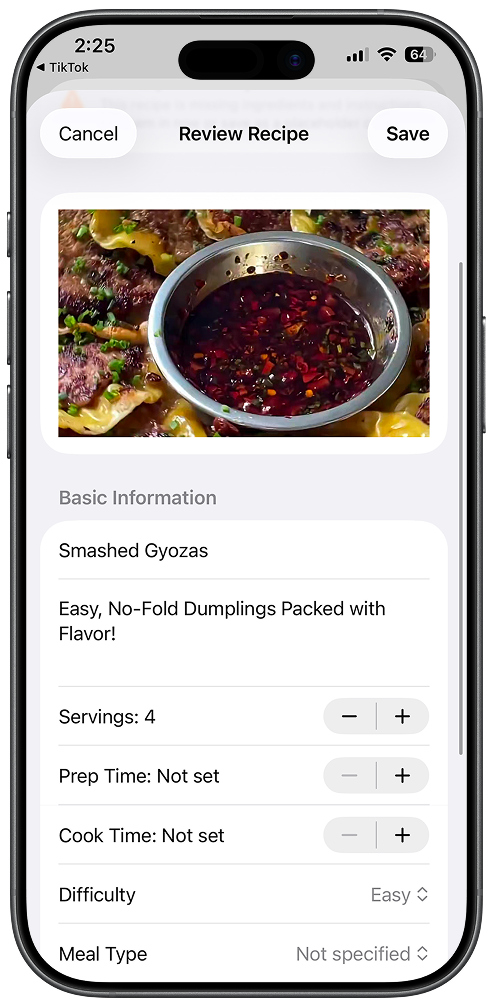
Recipe extracted from TikTok with ingredients and steps

How It Works

1

Find a Recipe on TikTok

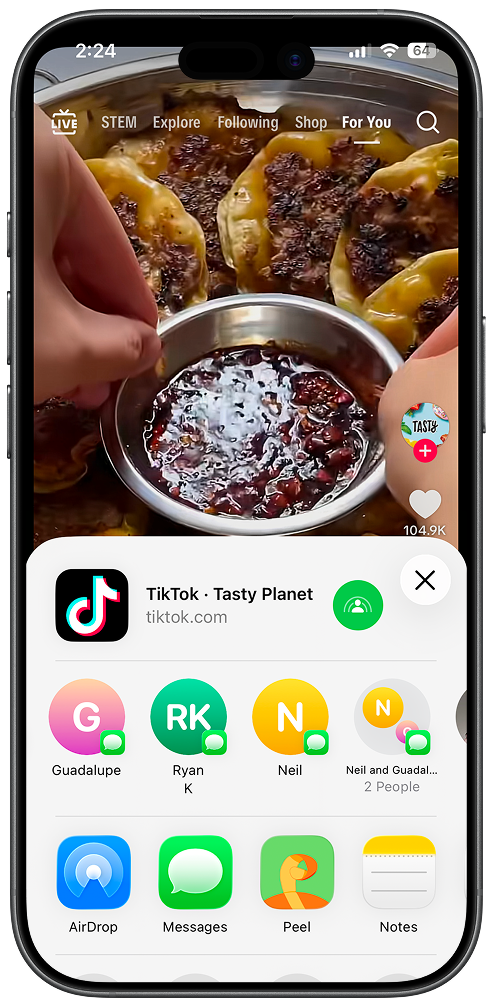
Scroll through your FYP or saved videos. When you find a recipe worth saving, tap Share.

2

Share to Peel

Tap Peel in the share menu and let Peel parse the recipe from the video.

3

Review and Save

Review the extracted recipe and add it to your Peel cookbook.

4

Cook From Your Recipe

Get a clean recipe card with ingredients and steps you can actually cook from.

Actually Use Those Saved Recipes

From TikTok video to your dinner table. Here's what Peel does after import.

Organized Ingredient Lists

Every ingredient parsed out with quantities. No more pausing the video to write things down.

Add to Grocery List Instantly

Add all ingredients to your shared grocery list instantly. Shop for multiple TikTok recipes at once.

Instant Sync to Partner

Save a recipe and it appears on your partner's phone immediately. No more texting links.

Searchable Library

Find recipes by name, ingredient, or tag. "Chicken" gives you every chicken recipe you've saved.

Add to Meal Plan

Drop TikTok recipes into your weekly meal plan. Finally use those saved videos.

Saved Forever

Even if the original video gets deleted, your recipe stays in Peel. It's yours to keep.

What Peel Extracts

Our AI extraction pulls everything you need from TikTok videos.

Ingredients

  • Full ingredient list with quantities
  • Measurement conversions when needed
  • Ingredient substitution notes

Instructions

  • Cooking instructions broken into clear steps
  • Timing and temperature details
  • Tips mentioned in the video

Metadata

  • Recipe title and description
  • Prep time and cook time
  • Serving size

Source

  • Link back to original video
  • Creator attribution
  • Video thumbnail

Frequently Asked Questions

Everything you need to know about saving TikTok recipes.

How do I save TikTok recipes to Peel?
There are two ways: Use the share extension by tapping Share on any TikTok video, then select Peel to import directly. Or copy the video link and paste it in Peel. Both methods extract the full recipe with ingredients and steps.
Does it work with all TikTok recipe videos?
Peel uses AI to extract recipes from most TikTok cooking videos. It works best when the video contains clear recipe information (ingredients shown or spoken). If extraction isn't perfect, you can easily edit the imported recipe to add missing details.
Is saving TikTok recipes free?
Free users can try importing TikTok recipes up to 5 times. After that, you'll need Peel Premium ($2.99/month or $29.99/year) for unlimited TikTok imports.
Can I share saved recipes with my partner?
Yes! With Peel Premium, you can share a kitchen with your partner. When you save a TikTok recipe, it instantly syncs to your partner's phone. You can both access the recipe, cook from it, and add it to your meal plan.
What if the TikTok video gets deleted?
Once you save a recipe to Peel, it's yours forever. Even if the original TikTok video is deleted, your extracted recipe (ingredients, steps, notes) stays in your Peel library. The video thumbnail and link will still show the original source for attribution.
Can I edit the extracted recipe?
Yes! After import, you can edit any part of the recipe - add missing ingredients, adjust quantities, modify steps, or add your own notes. The recipe becomes fully yours to customize.

Last updated: February 2026

From the Blog

Guides to help you save and organize recipes from social media.

Stop Screenshotting.
Start Cooking.

Turn your TikTok favorites into real recipes you'll actually make. Download Peel free today.

Free plan available
No sign up required
Partner sync with Premium

More Peel Features