Peel and Samsung Food are our main picks for free meal planning in 2026. Peel includes weekly credits for importing recipes from TikTok, Instagram, and YouTube videos. Samsung Food is a strong option if you cook from recipe websites and blogs. Mealime's guided planning remains available, but it closes on October 21, 2026. Choose based on where you find recipes and whether you want curated suggestions or a collection of your own.
Most "free" meal planning apps aren't really free. You download them, set up your profile, add a few recipes, start building your first meal plan, and then a paywall slides in, and the moment you stop paying, everything you built is locked away.
I spent a week testing meal planning apps with free tiers. Here's the distinction I looked for: a free trial is not the same as being able to keep saving recipes, planning meals, and making a grocery list without a subscription.
This is a list of the second kind.
Get Peel free and start planning → A real free tier with weekly social import credits, flexible meal planning, and automatic grocery lists. Your recipes are never locked out.
What "actually free" means in this post
Before we get into the apps, here's what qualifies as "actually free" for this list:
- Cancel anytime and keep your recipes
- No lock-out, your recipes stay after you cancel
- Core meal planning features work without a time-limited trial
- You can save recipes, plan meals, and make a grocery list without upgrading
If an app's free tier lets you browse recipes but locks planning and grocery lists behind a paywall, it didn't make the cut. And if the "free tier" is really just a trial that locks you out when it ends, I'm calling it out.
Samsung Food: the free app nobody talks about
Samsung Food (formerly Whisk) is the most feature-rich free meal planning app available right now, and almost nobody in the meal planning space mentions it.
What you get for free:
- Access to 240,000+ recipes, including 124,000 with guided step-by-step instructions
- Weekly meal planner calendar
- Grocery list generation from your meal plan
- Recipe import from any website URL
- Community sharing and recipe discovery
What you don't get: Samsung Food recently added Samsung Food+, a premium tier with AI-personalized meal plans and a smart cooking mode. But the core experience (saving recipes, planning your week, building a grocery list) is still completely free.
The catch: Samsung Food doesn't import recipes from TikTok, Instagram, or YouTube videos. If you find recipes on social media (which most people under 40 do now), you'll need to find the website version of that recipe or use a different app. It works great for website recipes, though.
Platforms: iOS, Android, and Web.
Samsung Food is genuinely surprising. It has the feature set of a $50/year app and charges nothing. If you primarily cook from recipe websites and blogs, this is the obvious choice.
Mealime: free while it winds down
Mealime's core workflow combines a curated recipe library, dietary preferences, and an automatic grocery list organized by category. That makes it useful for cooks who want help deciding what to make.
What you get for free:
- Build a meal plan from Mealime's recipe library
- Grocery list generated from your plan
- Dietary preference filters (vegetarian, gluten-free, etc.)
- Recipe browsing and cooking instructions
Current cost: All Pro features and recipes are now free during the wind-down, with no further subscription charges, according to Mealime's shutdown notice.
Can you bring your own recipes? Yes. Mealime documents web recipe imports in its mobile app. Its curated catalog is a strength, not a restriction to only those recipes.
What comes next: Meals Hub is its free successor in Albertsons Companies apps and includes Mealime's recipes. See the official transition details.
Platforms: iOS, Android, and Web.
If you want a different planning app, compare our Mealime alternatives by recipe source, grocery lists, and platform before choosing.
Peel: free meal planning for TikTok and Instagram recipes
Here's where I should be transparent: this is the Peel blog. I built Peel because I wanted an affordable way to go on a lifelong journey of building my family's kitchen, not to plan a single week. That shaped everything about how it works.
The reason Peel is on this list is straightforward: its free tier includes weekly-refreshing credits to import recipes directly from TikTok videos, Instagram Reels, and YouTube, plus meal planning and grocery lists. It is not the only free option for social recipes: ReciMe also offers five recipe imports per week, with meal planning and grocery lists available without a subscription.
What you get for free:
- Save recipes from any website URL (unlimited)
- TikTok, Instagram, and YouTube imports on a free pool of credits that refreshes every week
- Recipe collections with search
- Flexible meal planning using a meal pool, not a day-by-day calendar
- Grocery list generation from your meal pool
- Send individual recipes or full meal plans to connections, and receive shared recipes in your inbox (v2.0)
About the meal pool: Instead of filling in Monday through Sunday, you add recipes to a pool and cook whatever sounds good that day. I built it that way because a rigid calendar felt like failure every time something came up mid-week and a slot went unfilled. The pool flexes. A calendar doesn't.
From a saved recipe to a grocery list
These example screens show recipe saving, a flexible meal pool, and a categorized grocery list.
-
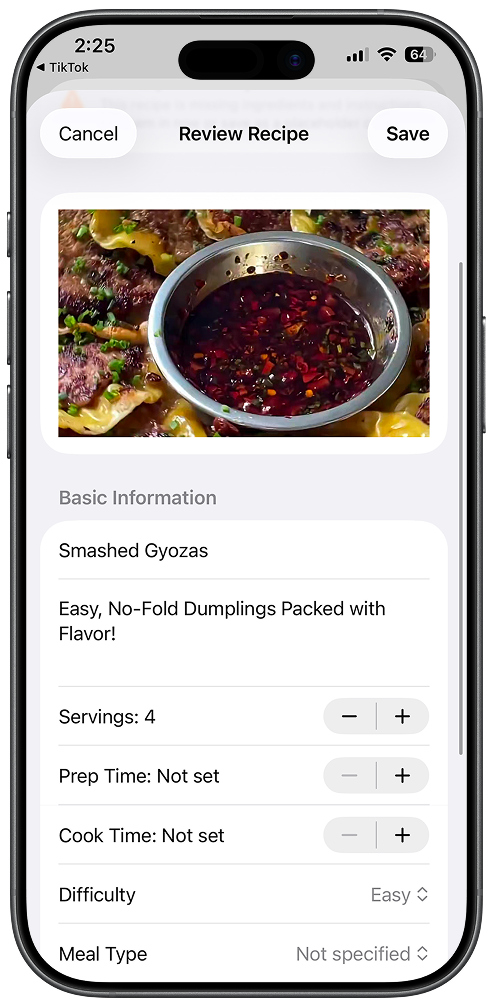
1. Save a recipeImport a recipe you want to cook. Review it before saving it to your collection. -
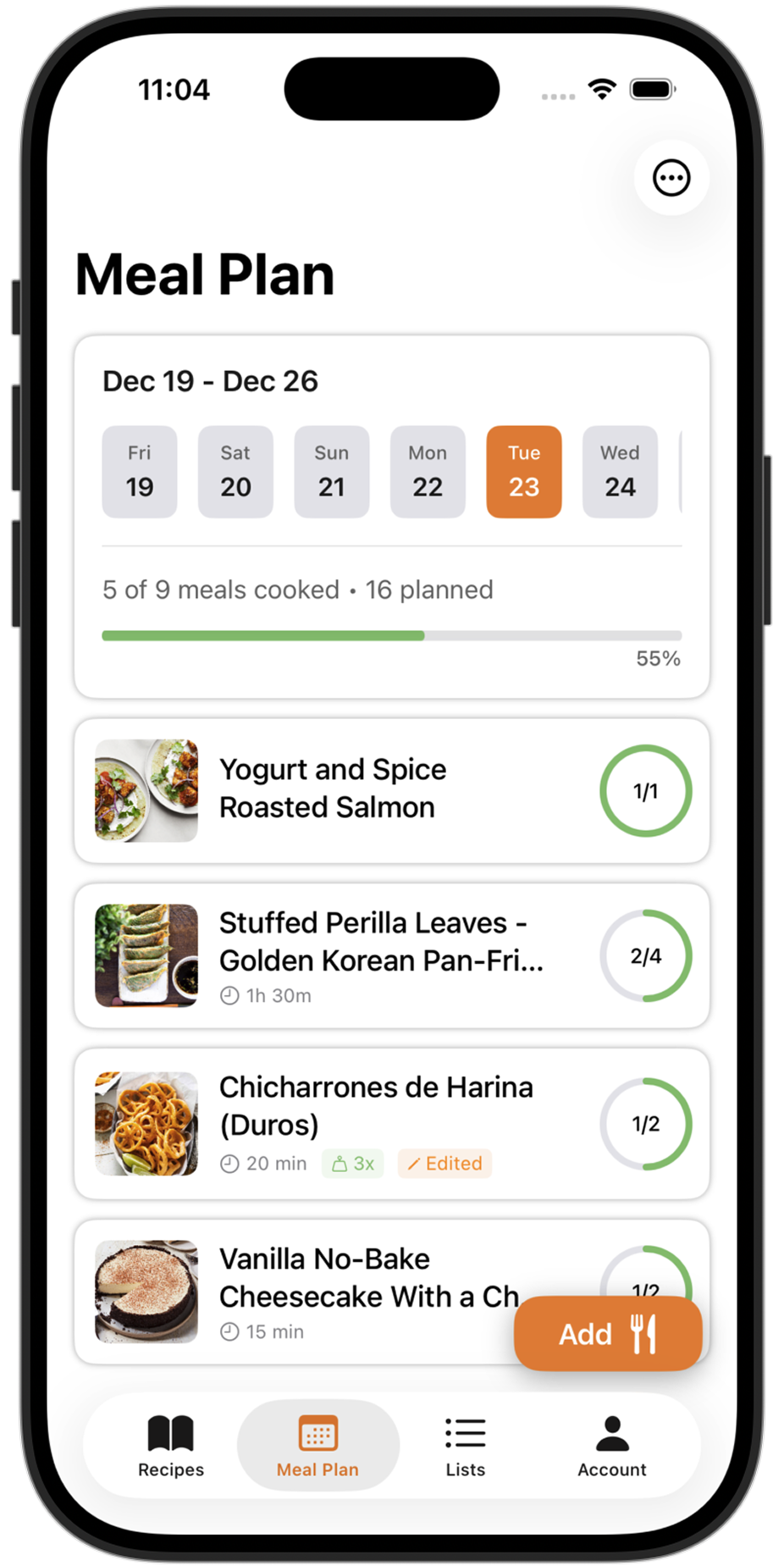
2. Fill your meal poolGroup the recipes you plan to cook. Choose which one to make when the day comes. -
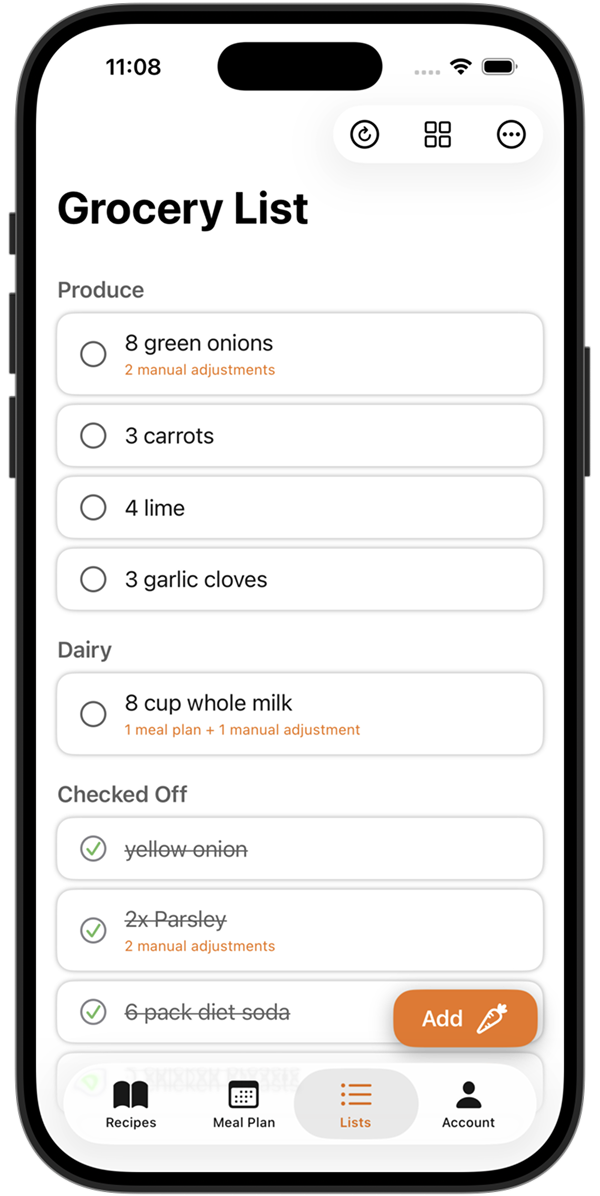
3. Build your grocery listTurn your meal plan into one list that combines quantities and groups ingredients by category.
Web imports, meal planning, and grocery lists are free. Social imports use credits that refresh weekly. Try Peel on iPhone or iPad with a recipe you already cook.
One honest note on the name: "meal pool" isn't an industry term. I made it up, because it described the point better than anything else I could find. It's just the set of meals you plan to cook, gathered in one place, that you draw from as the days go. Make it a week or make it longer, whatever matches your rhythm.
What happens after a plan works: you save it, then pull it back up weeks later, tweak a recipe or two, and reuse it as a base instead of starting from a blank week. Over time you build a small shelf of plans that already fit how your household eats. A folder of saved recipes is just where the ideas live. A saved plan is where those ideas have been arranged into something you can actually cook this week. Day to day it comes down to two questions: what do I want to eat today, and what does tomorrow look like? Busy tomorrow, I make something that leaves leftovers. Just tonight to cover, I make a single meal.
What you don't get on free: Unlimited TikTok, Instagram, and YouTube imports require Premium. Partner kitchen sharing (one live shared kitchen for two people) is also Premium.
Why social imports are premium: The principle behind the split is simple: if it costs money to run, I ask users to pay for it. If it doesn't, I offer it free. Social media imports use AI extraction, which has a per-import cost. That's why there's a free allowance and unlimited requires Premium.
Why this matters: If you discover dinner ideas while scrolling TikTok at lunch, Peel turns those videos into recipes with ingredients and steps. Group them into a meal pool, then turn your plan into one grocery list that combines quantities and sorts ingredients by category. Mealime also supports web recipe imports, so the choice is about your recipe sources and planning workflow, not whether you can bring your own recipes at all.
The free allowance gives you enough to test whether the AI extraction works for the recipes you care about.
Platforms: iOS (Android coming).
App Store rating: 4.9 out of 5 as of August 2026.
Prepear: recipe browsing is free, but planning gets expensive
Prepear connects you to a community of food bloggers and lets you discover and save recipes from their network.
What you get for free:
- Recipe discovery from Prepear's food blogger community
- Recipe saving and organization
- Basic recipe browsing
What you don't get: The meal planner, grocery list, and nutrition features are part of Prepear Gold at $119.99/year. That's more than double what most competitors charge for premium features.
Prepear's free tier is more of a recipe discovery tool than a meal planning app. If you want to browse food blog recipes and save ones you like, it works fine. But if "free meal planning" means actually planning your week and generating a grocery list, you'll hit the paywall.
Platforms: iOS, Android, and Web.
Not actually free: the apps you'll see on other lists
Two apps show up constantly in "best free meal planning apps" roundups despite not being free. Worth clearing up:
Plan to Eat offers a 14-day free trial, then charges $5.95/month or $49/year. There is no permanent free tier. When your trial ends, you lose access to everything. Fortune named Plan to Eat "best meal planning app with grocery lists" in March 2026, it's a good app, but it's not free. Read our full Peel vs Plan to Eat comparison for details.
Paprika costs $4.99 upfront on iOS (one-time purchase). It's the most affordable paid option and genuinely good for recipe organization, but it's not free either. If you see it on a "free apps" list, someone's confusing "cheap" with "free."
Which free app should you actually use?
It depends on where your recipes come from.
You cook from recipe websites and blogs: Samsung Food. It's free, full-featured, and handles website recipe import well. Hard to beat at zero dollars.
You want curated recipe suggestions: For Mealime's catalog, consider Meals Hub; Mealime itself is closing. See the transition details above before starting a new collection there.
You find recipes on TikTok, Instagram, or YouTube: Peel is our pick if you want to gather those recipes into a flexible meal pool. The free tier includes weekly-refreshing social import credits. ReciMe is another option with a weekly free import allowance, so compare the planning workflow as well as the import limit.
You just want to browse food blog recipes: Prepear. Its free tier is a recipe discovery tool connected to food bloggers. Useful for inspiration, less useful for actual meal planning.
Free meal planning apps compared
| App | Free tier | Premium price | Platforms | Best for |
|---|---|---|---|---|
| Peel | Unlimited recipe storage, meal planning, grocery lists, weekly-refreshing social import credits | $2.99/mo or $29.99/yr | iOS | TikTok, Instagram & YouTube recipes |
| Samsung Food | Full planner, grocery lists, 240,000+ recipes, website import | Samsung Food+ (optional, AI plans) | iOS, Android, Web | Website & blog recipes |
| Mealime | Recipe library, web imports, meal plans, grocery list | Free until Oct 21, 2026 | iOS, Android, Web | Existing users before shutdown |
| Prepear | Recipe discovery and saving only | Prepear Gold, $119.99/yr | iOS, Android, Web | Browsing food blogger recipes |
| Plan to Eat | 14-day trial only, no permanent free tier | $5.95/mo or $49/yr | iOS, Android, Web | Not actually free |
| Paprika | No free tier | $4.99 one-time | iOS, Android, Web, Mac, Windows | Cheap paid recipe organization |
When to upgrade from free
Free tiers are meant to get you started, not keep you forever. Here's when it makes sense to pay:
- You're regularly saving recipes from social media and the free allowance runs out, unlimited imports become worth it
- You want a shared grocery list with your partner, most free tiers don't include sharing
- You've outgrown browsing and want real weekly planning, the structure of a paid planner calendar saves real time
- You're cooking 4+ nights a week, at that point, even a low monthly subscription pays for itself in reduced food waste
The average American household spends $170/week on groceries, according to IBTimes reporting on 2025-2026 USDA data. Even a modest reduction in impulse buying and food waste (the kind that comes from actually having a plan) pays for any of these apps many times over.
But start free. Figure out which workflow fits how you actually cook. Then upgrade when the free tier starts feeling limiting, not before. If you want to see how all the paid options compare, check out our full 2026 meal planning app comparison.
Originally published March 2026. Updated October 16, 2026. The screenshot walkthrough was added in this update; the app comparisons were not re-tested.