From Recipe to
Grocery List in Seconds

Stop typing grocery lists. Sync ingredients from any recipe or your entire meal plan in a few taps. Peel combines quantities, organizes by aisle, and keeps your partner in sync.

Download on the App Store
Free forever
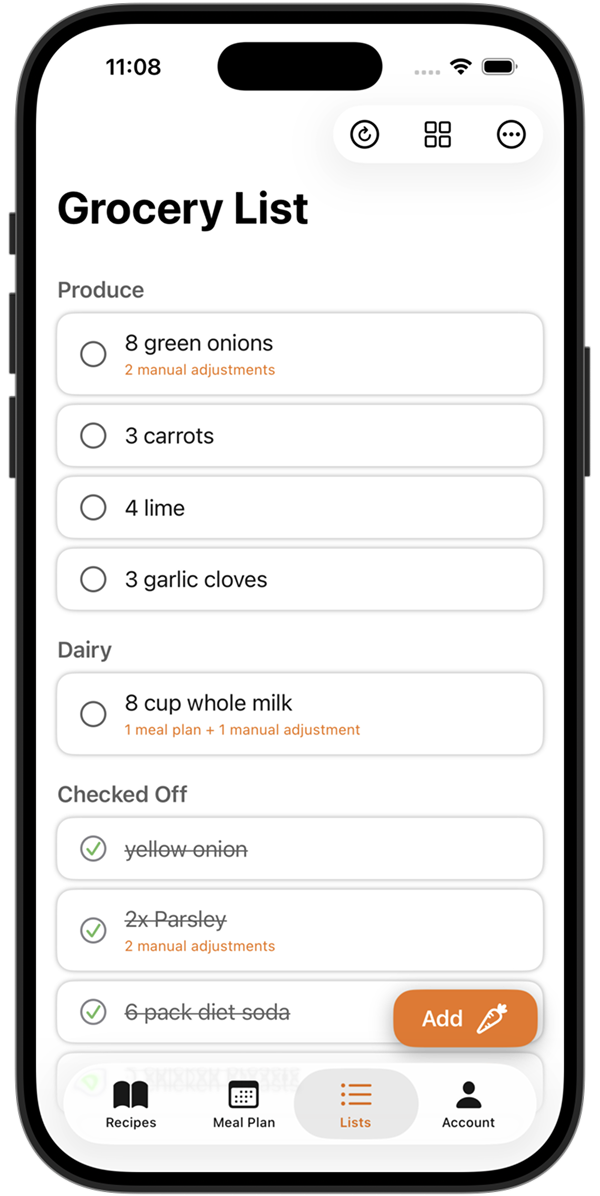
Peel grocery list auto-generated from meal plan recipes

The Grocery List Problem

You know what you want to cook. Getting those ingredients into a list? That's the hard part.

Typing Every Ingredient

You have 5 recipes planned. That's 40+ ingredients to manually type into a list. Who has time for that?

Forgetting Ingredients

You're at the store and realize you forgot the cumin. Again. Now dinner plans are ruined or you're making a second trip.

Duplicate Entries

Three recipes need onions. Is that 3 onions total or did you list it three times? Time to do math at the store.

Disorganized Lists

Your list is in the order you thought of things, not the order of the store. You're zigzagging through every aisle.

Recipes Live Somewhere Else

Your recipes are saved in TikTok, your list is in Notes. You're constantly switching apps and copying ingredients by hand.

Partner Out of Sync

They went to the store but don't know what you're planning to cook. Now you have random groceries and no dinner plan.

The Solution

Sync Ingredients in a Few Taps

Pick what you want to cook. Tap to sync. Done.

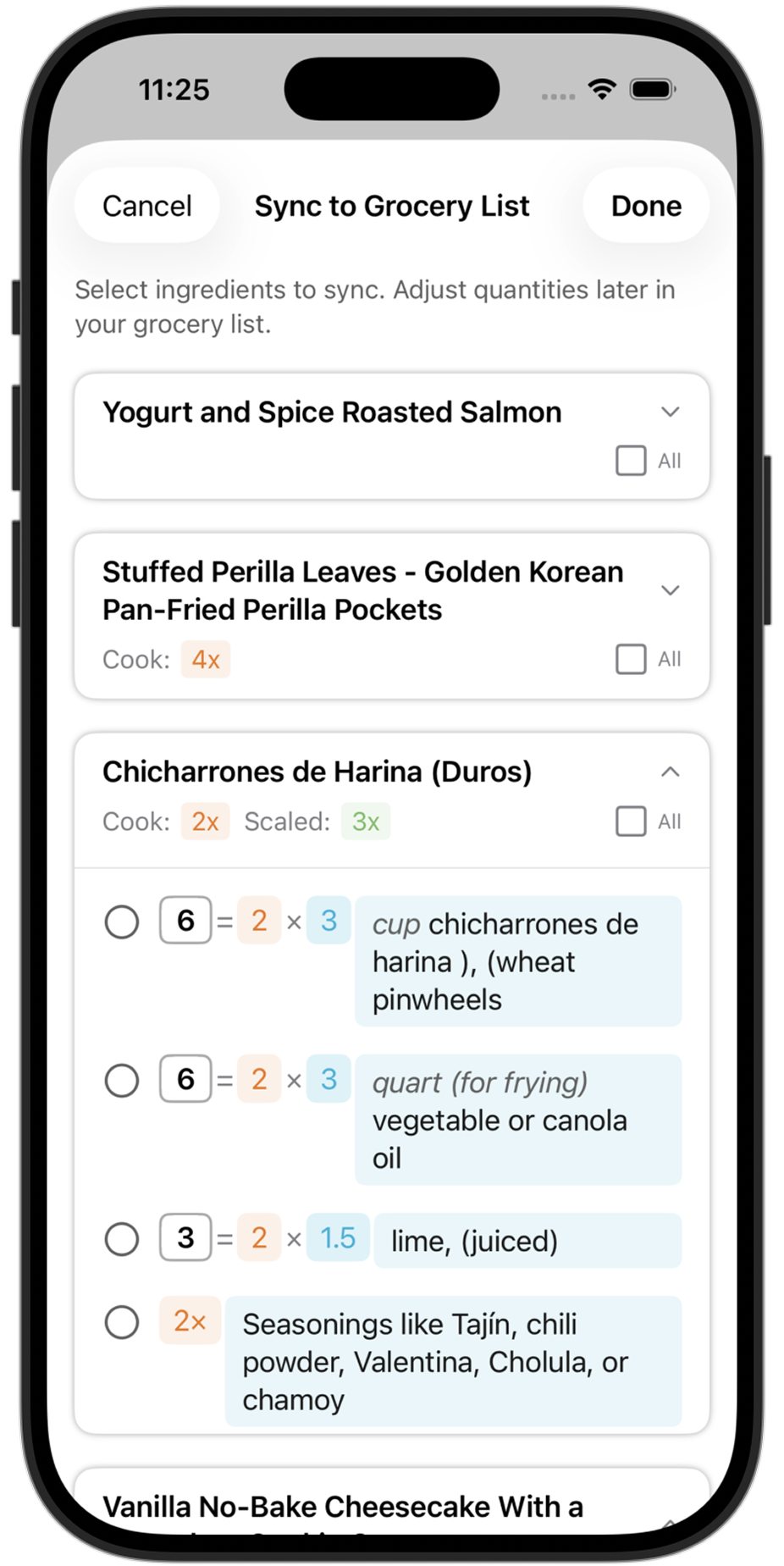
Sync recipe ingredients to grocery list

How It Works

1

Save Recipes & Build Your Meal Plan

Add recipes from TikTok, Instagram, websites, or your own collection. Build a meal plan for the week.

2

Sync to Your Grocery List

Tap to add ingredients from a single recipe, or sync your entire meal plan at once. A few taps, not 40 typed items.

3

Peel Combines Ingredients Smartly

Two recipes need garlic? You'll see "garlic (6 cloves)" — not two separate entries.

4

Shop with Confidence

Your list is complete, organized by aisle, and synced with your partner. Just shop.

Smart Ingredient Combining

No Duplicates. No Math. No Guessing.

When you sync ingredients from multiple recipes, Peel combines them into single line items with total quantities. No more wondering "wait, how many onions do I actually need?"

EXAMPLE: 3 RECIPES THIS WEEK

Garlic 8 cloves (from 3 recipes)
Olive oil ½ cup (from 2 recipes)
Yellow onion 3 medium (from 3 recipes)
  • Quantities automatically totaled across recipes
  • See which recipes need each ingredient
  • Adjust quantities or remove items anytime
Smart ingredient combining in Peel grocery list

A Grocery List That Actually Works

Connected to your recipes. Synced with your partner. Ready when you are.

Sync from Recipes in Taps

Add ingredients from any recipe or your entire meal plan to your list. A few taps, not 40 typed items.

Smart Combining

Multiple recipes need the same ingredient? Peel totals the quantities automatically.

Organized by Aisle

Items grouped by category: produce, dairy, meat, pantry. Shop the store efficiently.

Synced with Partner

Share a kitchen and your grocery list syncs automatically. Both see updates in real time.

Fully Editable

Add your own items, adjust quantities, or remove what you already have. It's your list.

Recipe Traceability

See which recipe each ingredient comes from. Know exactly why it's on your list.

Why Peel vs. Other Grocery Apps?

Most grocery list apps are just fancy note pads. Peel is different.

Other Grocery Apps

  • Type every ingredient manually
  • No connection to what you're cooking
  • Duplicate entries for same ingredients
  • Easy to forget ingredients
  • Separate from your recipe collection

Peel Smart Grocery List

  • Sync ingredients from recipes in taps
  • Directly connected to your meal plan
  • Smart combining across recipes
  • No typing individual ingredients
  • Recipes + meal plan + list in one app

Frequently Asked Questions

Everything you need to know about Peel's smart grocery list.

How do I add recipe ingredients to my grocery list?
From any recipe, tap to add its ingredients to your list. Or from your meal plan, sync all the ingredients at once in a few taps. Either way, Peel combines quantities smartly—if three recipes need garlic, you'll see one entry with the total amount.
What if I already have some ingredients at home?
The list is fully editable. Swipe to remove items you already have, adjust quantities, or add your own items that aren't from recipes. It's auto-generated but you're always in control.
Can I see which recipe each ingredient is from?
Yes! Each ingredient shows which recipe (or recipes) it comes from. This is helpful when you're at the store and wondering "why do I need 6 cloves of garlic again?"
Does my partner see the same list?
Yes! When you share a kitchen in Peel, you share everything—recipes, meal plans, and the grocery list. When either of you adds recipes to the meal plan, both of your grocery lists update. When one of you checks off an item at the store, the other sees it in real time.
Is this feature free?
Yes! The smart grocery list is completely free, including syncing ingredients from recipes, smart combining, and category organization. No premium required.
Can I add items that aren't from recipes?
Absolutely. Tap the add button to manually add any item—paper towels, coffee, snacks, whatever you need. The list combines auto-generated recipe ingredients with your manual additions.

Last updated: February 2026

From the Blog

Meal planning tips that pair perfectly with smarter grocery lists.

Stop Typing Grocery Lists

Let your recipes do the work. Download Peel free today.

Sync from recipes in taps
Smart ingredient combining
Synced with partner

More Peel Features