Both Peel and Plan to Eat help you collect recipes and turn them into a weekly meal plan with a grocery list. They're two of the most recipe-focused meal planning apps available in 2026, and neither one generates meals for you or tries to be a calorie tracker.
That's where the similarities end. They have different planning philosophies, different pricing, and different strengths. This comparison covers what actually matters so you can pick the one that fits how you cook.
If you are comparing several replacements, our Yummly alternatives guide puts both planning styles in the wider recipe-app landscape.
The quick version
Plan to Eat is a calendar-based meal planner with a web recipe clipper, available on iOS, Android, and web. It costs $5.95/month or $49/year with no free tier (14-day trial available).
Peel is a flexible meal planner built around saving recipes from social media videos. It uses a "meal pool" instead of a calendar. It's iOS-only for now, with a free tier and Premium at $2.99/month or $29.99/year.
If you want a traditional calendar planner with cross-platform access, Plan to Eat is the more mature option. If you find most of your recipes on TikTok, Instagram, or YouTube and want a more flexible planning approach, Peel is purpose-built for that workflow.
How you get recipes in
This is the biggest practical difference between the two apps.
Plan to Eat has a browser extension (the "Recipe Clipper") that scrapes recipe pages from the web. You click the bookmarklet or share extension on a recipe website, and it pulls in the ingredients and instructions. It also supports importing from Instagram, Facebook, Pinterest, and TikTok through its share extension on mobile. For TikTok specifically, Plan to Eat relies on whatever text is available in the post description or linked recipe page.
Peel uses AI to extract recipes from video content. Share a TikTok, Instagram Reel, or YouTube video to Peel, and it watches the video, listens to the audio, and pulls out ingredients with quantities and step-by-step instructions. This works even when the creator never writes the recipe down. Peel also imports from recipe websites.
The difference matters most for social media recipes. If a TikTok creator shows you a recipe in a 60-second video but never posts the ingredient list, Plan to Eat's clipper won't have much to work with. Peel's AI extraction will still produce a full recipe from the video. If most of your recipes come from food blogs and recipe websites, both apps handle that well.
How meal planning works
This is where the two apps have fundamentally different philosophies.
Plan to Eat uses a calendar. You drag recipes onto specific days of the week. Monday is chicken stir-fry, Tuesday is pasta, and so on. You can rearrange meals by dragging them to different days, and the grocery list updates automatically. This is the traditional approach to meal planning, and Plan to Eat executes it well. If you like seeing your whole week mapped out on a calendar, it feels natural.
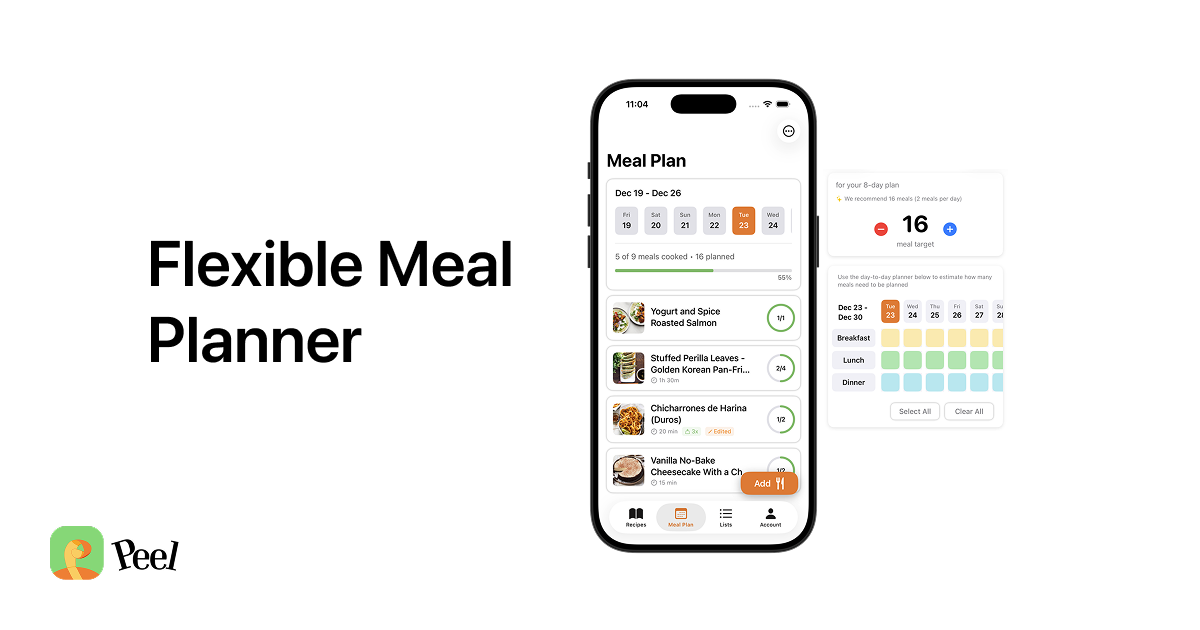
Peel uses a meal pool. Instead of assigning recipes to days, you add recipes to a pool for the week. When it's time to cook, you pick from whatever's in the pool based on your mood, energy, or what's quickest. The grocery list generates from the entire pool, so you shop for everything at once.
The meal pool approach came from a simple observation: most people don't actually follow a day-by-day meal plan. Something comes up on Tuesday, you're tired on Wednesday, and by Thursday the plan is abandoned. The pool gives you the same benefits of planning (knowing what to buy, having options ready) without the rigidity that makes most people quit.
Neither approach is objectively better. Calendar planning works well if your weeks are predictable and you like structure. The meal pool works better if your schedule shifts, your energy varies, or you just want dinner to feel like a choice, not an assignment.
Pricing
| Peel | Plan to Eat | |
|---|---|---|
| Free tier | Yes (limited social media imports) | No |
| Monthly | $2.99 | $5.95 |
| Annual | $29.99 | $49 ($54.99 via App Store) |
| Trial | Trial, then a permanent free tier (no lock-out) | 14-day free trial |
Peel's free tier includes unlimited recipe storage and web imports. Social import credits refresh weekly, while Premium includes unlimited social imports.
Plan to Eat doesn't offer a free tier at all. They've been transparent about why: they're fully customer-funded and don't sell user data. The 14-day trial is the only way to test it, after which it's $5.95/month or $49/year.
Both apps avoid the pricing creep you see with some competitors. Neither charges $99/year or locks basic features behind premium tiers.
Platform availability
Plan to Eat: iOS, Android, and web. The web version is a full-featured experience, not a stripped-down companion. You can manage recipes, plan meals, and access your grocery list from any browser. The apps sync with the web account.
Peel: iOS only, with Android in development. There's no web version. Everything happens on your iPhone.
This is Plan to Eat's clearest advantage. If you use Android, Plan to Eat is the obvious choice since Peel isn't available. If your household has mixed devices (one iPhone, one Android), Plan to Eat works for both. The web version is also useful for browsing recipes on a larger screen while cooking.
Grocery lists
Both apps generate grocery lists from your planned meals, which is table stakes for a meal planning app in 2026.
Plan to Eat was recently named "best meal planning app with grocery lists" by Fortune. Their grocery list groups ingredients by store aisle and combines quantities across recipes (if two recipes need onions, you see one entry for the total). You can add manual items and check things off as you shop.
Peel generates grocery lists from whatever's in your meal pool. It also combines ingredients across recipes and supports sharing the list with a partner in real time. If your partner checks off milk at the store, you see it update on your phone.
Plan to Eat's grocery lists also sync with a partner through their "Friend" sharing feature. Both apps handle the core grocery list well. Plan to Eat's aisle grouping is more granular. Peel's real-time sync is more fluid.
Sharing and collaboration
Plan to Eat lets you share recipes with other Plan to Eat users (they call it the "Friend" feature). Both users need their own paid subscription. You can share individual recipes or your full recipe book with a friend.
Peel includes shared kitchens in its Premium plan. You and a partner share one kitchen with the same recipes, meal pool, and grocery list. Only one person needs Premium for the household. This makes Peel's effective per-person cost even lower if you're planning meals together.
Recipe organization
Plan to Eat has been around since 2012 and has had years to refine its recipe management. You get tags, categories, courses, and a search function. Their recipe book can handle hundreds or thousands of recipes. The browser extension makes it easy to clip recipes as you find them online.
Peel organizes recipes into collections, and you can search your saved recipes. It's newer, so the organizational tools are simpler. The tradeoff is that importing from social media is seamless, where Plan to Eat's strength is web-based recipe clipping.
Who should pick Plan to Eat
- You find recipes mostly on food blogs and recipe websites
- You want a calendar-based meal planner with day-by-day structure
- You use Android, or your household has mixed iOS and Android devices
- You want a web version for managing recipes on your computer
- You've been meal planning for a while and want a mature, refined tool
- You're comfortable paying $49/year for a focused, no-nonsense app
Who should pick Peel
- You discover recipes on TikTok, Instagram, or YouTube and want them extracted from video
- You prefer flexible planning over rigid day-by-day calendars
- You've tried traditional meal planning and quit because it felt too rigid
- You want a permanent free tier that keeps your recipes even after you cancel
- You plan meals with a partner and want real-time shared grocery lists
- You're on iOS and want the most affordable premium option ($29.99/year)
The honest take
Plan to Eat is the safer, more established choice. It's been around for over a decade, works on every platform, and does calendar-based meal planning well. Fortune endorsed it for a reason. If you already have a meal planning habit and want a reliable tool to support it, Plan to Eat is solid.
Peel is built for a different kind of cook: someone whose recipe collection lives in TikTok saves, Instagram bookmarks, and YouTube playlists. The AI video extraction and flexible meal pool address a problem that didn't really exist when Plan to Eat launched. If you've tried calendar-based meal planning and bounced off it, Peel's approach is worth testing, and its free tier is permanent: cancel anytime and your recipes are never locked out.
Both apps respect your time and your recipes. Neither tries to be a calorie tracker, a diet coach, or an AI that picks your meals for you. They both assume you know what you want to eat and just need a better system for getting it to the table.
Last updated: March 2026