Until recently, this comparison didn't make much sense. Pestle was the beautifully designed recipe manager for Apple users. Peel was the meal planning app that saved recipes from social media. Different apps, different jobs.
Then Pestle added TikTok and Instagram import. And Peel already had it. So now both apps let you save recipes from social media videos, and the obvious question is: which one should you actually use?
I spent time with both to figure out where they overlap and where they don't. The short answer: they're solving different problems, even though they start in the same place.
For a broader set of recipe-app choices, see our guide to the best Yummly alternatives before narrowing the decision to Peel and Pestle.
What they have in common
Before getting into differences, here's what Peel and Pestle share:
- TikTok and Instagram recipe import. Both can turn a cooking video into a proper recipe with ingredients and steps.
- Website recipe import. Paste a URL, get a clean recipe without the ads and life stories.
- Free tiers. Both offer a real free tier you can keep using.
- iOS apps. Both are available on iPhone.
- Grocery lists. Both can generate shopping lists from your saved recipes.
- Nearly identical pricing. Peel Premium is $2.99/month or $29.99/year. Pestle Pro is $2.99/month or $24.99/year. Close enough that price shouldn't be the deciding factor.
If all you need is "save a TikTok recipe and get a grocery list," either app will do the job. The difference is what happens next.
Where Pestle wins: the cooking experience
Pestle is built for the moment you're standing at the stove. It's a cooking companion first, recipe manager second.
Guided cooking mode. Pestle walks you through recipes step by step with hands-free voice control. Say "next step" and it advances. This is genuinely useful when your hands are covered in raw chicken.
Multiple simultaneous timers. If a recipe says "simmer for 20 minutes, then bake for 35," Pestle tracks both timers at once. Small feature, big difference when you're juggling multiple things on the stove.
Apple Watch support. You can follow recipes and manage timers from your wrist. Helpful if your phone is across the kitchen and you don't want to touch it with messy hands.
FaceTime SharePlay. Cook the same recipe with a friend over video. It's a niche feature, but if you've ever tried to cook "together" over a phone call, you'll appreciate it.
Apple Intelligence integration. Pestle's iOS 26 update added on-device AI for recipe parsing, plus a redesigned interface with Apple's Liquid Glass style. If you care about apps that feel native to your iPhone, Pestle is polished.
Apple ecosystem depth. Pestle runs on iPhone, iPad, Mac, and Apple Watch. If you're deep in the Apple ecosystem, everything syncs smoothly.
The cooking experience in Pestle is genuinely good. For the actual act of following a recipe in the kitchen, it's hard to beat.
Where Peel wins: the planning workflow
Peel is built for the question that comes before cooking: "what are we eating this week?"
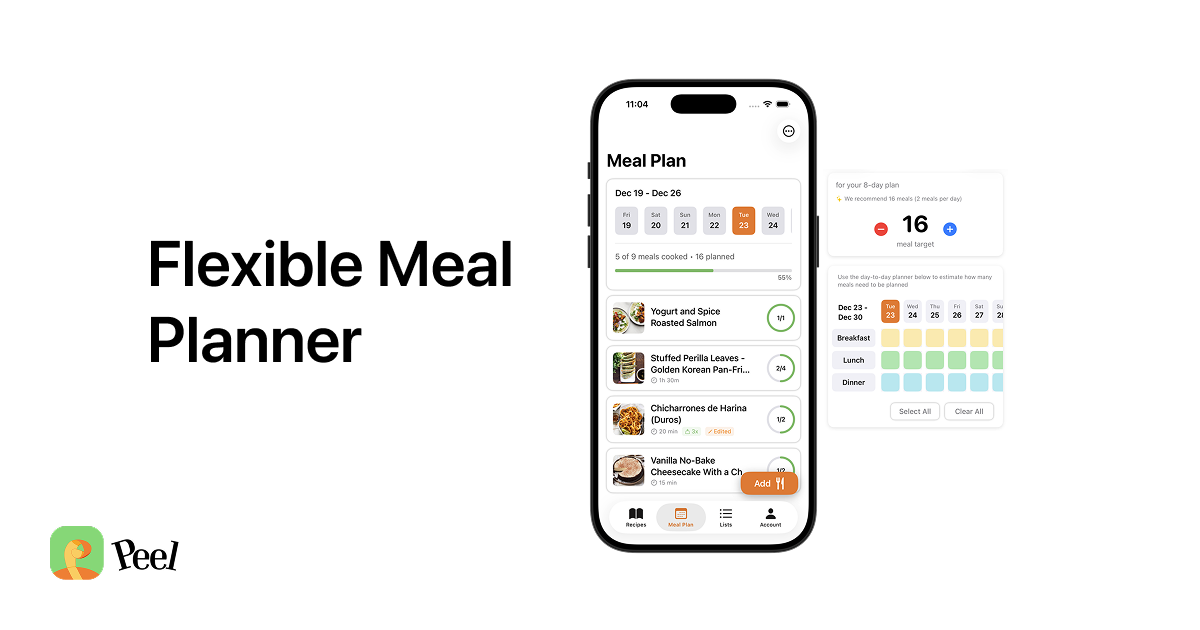
Weekly meal planning with a meal pool. Peel's core feature is the meal pool, where you collect recipes for the week without assigning them to specific days. You pick what to cook each night based on your mood, energy, and what's in the fridge. It's planning without the rigidity that makes most meal plans fail.
Combined grocery lists from your plan. When you add recipes to your meal pool, Peel combines all the ingredients into one grocery list. If three recipes call for onions, you see the total amount, not three separate entries. This is the difference between a recipe-level grocery list and a meal-plan-level one.
Shared kitchen for couples and families. With Peel Premium, you and a partner share the same recipe collection, meal pool, and grocery list in real time. Both of you can add recipes, plan meals, and check off groceries from your own phones.
Save from YouTube too. Beyond TikTok and Instagram, Peel also imports recipes from YouTube cooking videos. If you find recipes across multiple platforms, Peel handles all of them in one place.
The full workflow. Peel is designed around a complete loop: find a recipe on social media, save it, add it to your weekly plan, generate a grocery list, shop, cook. Pestle handles the first and last steps well. Peel connects all of them.
The real difference: cooking companion vs. planning system
Here's the clearest way to think about it:
Pestle answers: "I have a recipe. Help me cook it."
Peel answers: "I have a bunch of recipes scattered everywhere. Help me figure out what to cook this week, get everything I need at the store, and actually make it happen."
Pestle assumes you already know what you're making tonight. Peel helps you decide.
If your main frustration is fumbling with your phone while cooking, Pestle is probably the better fit. If your main frustration is the Sunday night "what are we eating this week?" conversation, that's Peel's territory.
Platform matters
This is worth calling out: Pestle is Apple-only. iPhone, iPad, Mac, Apple Watch. There's no Android app, and there's no indication one is coming. If your partner uses Android, they can't share a Pestle library with you.
Peel is iOS now with Android coming. If anyone in your household uses Android, or if you might switch in the future, that's a practical consideration.
For households where everyone has iPhones, this doesn't matter. For mixed-platform households, it narrows the choice.
Price comparison
| Peel | Pestle | |
|---|---|---|
| Free tier | Yes | Yes |
| Monthly | $2.99 | $2.99 |
| Annual | $29.99 | $24.99 |
| Lifetime | $49.99 | $39.99 |
Pestle is slightly cheaper on annual and lifetime plans. The difference is small enough that it shouldn't drive your decision. Both are well under the cost of a single takeout order per month.
Quick decision guide
Pick Pestle if:
- You live entirely in the Apple ecosystem
- You want guided, hands-free cooking with voice control
- You already know what you're cooking most nights; you just need a good recipe manager
- Apple Watch recipe access matters to you
- You cook with friends over FaceTime (really)
Pick Peel if:
- You need help planning what to eat each week, not just storing recipes
- You want a combined grocery list generated from your whole week's plan
- You share meal planning with a partner (especially if they use Android)
- You save recipes from TikTok, Instagram, and YouTube
- You've tried rigid meal plans and need something more flexible
Pick both if:
You want Peel's planning workflow for the week and Pestle's guided cooking at the stove. They don't conflict. But most people will find one app covers enough of what they need.
The bottom line
A year ago, this comparison would have been simple: Pestle for saving and cooking recipes, Peel for planning meals. Pestle's recent addition of TikTok and Instagram import blurs that line, but it doesn't erase the fundamental difference.
Pestle made saving recipes from social media better. It didn't add meal planning. And Peel's meal planning (the weekly pool, the combined grocery list, the shared kitchen) is what separates it from every recipe manager on the market.
If you know what you're cooking and want help executing, Pestle is excellent. If you're staring at a fridge full of groceries wondering what to make, or dreading the "what's for dinner?" question, try Peel. The free tier is enough to see if the workflow clicks.
Last updated: March 2026