To save recipes from social media on iPhone with Peel, share a TikTok, Instagram, YouTube, or Pinterest post from the iOS share sheet. Peel turns it into a structured recipe with ingredients and steps. Free accounts get social-import credits that refresh every week, while recipe links from websites, including links opened from Facebook posts, can be imported without a web-import limit.
Saving the post is only the first step. I described Peel's meal pool this way: "A folder or a collection of saved recipes is just a place where the ideas live." Peel gives those ideas somewhere to go next. They enter a flexible meal plan, which becomes a categorized grocery list. This guide covers that full workflow across the major social platforms.
Why Screenshots and Saved Folders Don't Work
Every social media platform has its own version of "saving" that fails when you actually want to cook. TikTok's Favorites folder mixes cooking videos with everything else you've ever saved. Instagram's Saved folder loses access when accounts go private or get deleted. YouTube playlists are organized by when you saved, not by what the recipe contains. Pinterest boards are the closest thing to a usable recipe collection, but they still drop you into a recipe website packed with ads and a three-page backstory before the ingredients.
The core problem: every platform saves a video or image, not a recipe. Saving is the easy part. Getting to the ingredients when you're standing at the stove with your hands full is where every method breaks. There's a better way to save TikTok recipes that doesn't involve screenshots, bookmarks you'll never find, or pausing videos at exactly the right frame. Peel keeps recipes from websites and social platforms in one collection, then connects them to meal planning and grocery lists.
How to Save TikTok Recipes (Extract the Recipe, Not Just the Video)
TikTok is where most people first encounter this problem. A creator makes garlic bread in 45 seconds, lists five ingredients at speed, and you're left trying to screenshot the right frame while the video keeps playing. If you've been screenshotting TikTok recipes, you've probably noticed some issues:
- Videos pause at the wrong moment. You wanted the ingredient list, but you captured the creator's face mid-sentence instead.
- Ingredients flash by too fast. TikTok recipes are designed for entertainment, not instruction. Key details appear for fractions of a second.
- No measurements, just vibes. "A splash of this, a handful of that" is charming to watch but useless when you're actually cooking.
- Your camera roll is chaos. Good luck searching for "that pasta thing from three weeks ago" among 2,000 photos.
- Videos get deleted. Creators remove videos all the time. Once it's gone, your recipe is gone with it.
The screenshot method is a workaround, not a solution. There's a reason you haven't actually cooked most of those saved recipes.
How to Actually Save TikTok Recipes
The solution is to extract the recipe from the video, turning a 60-second TikTok into a proper recipe with ingredients, quantities, and steps you can follow while cooking.
The Peel method:
- Find the cooking video on TikTok.
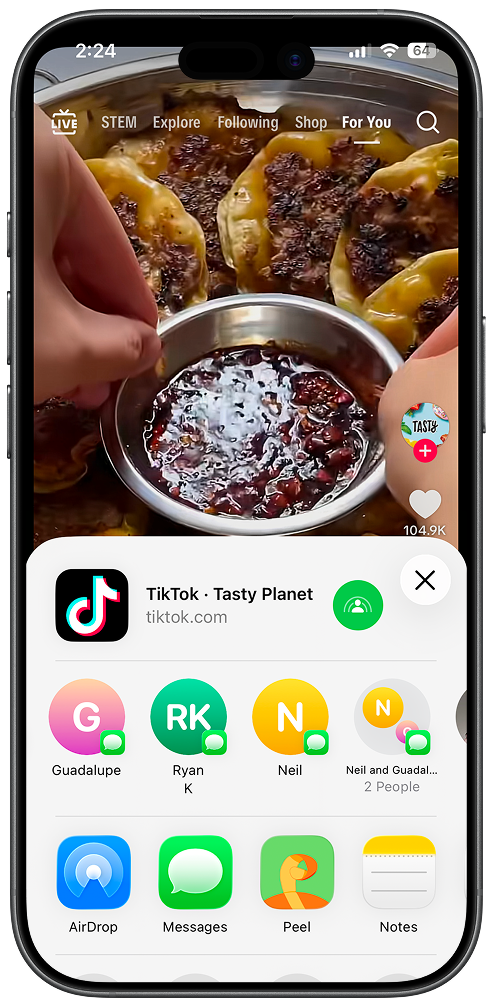
- Tap the Share button (the arrow icon on the right side).
- Scroll through the share sheet and tap Peel.
- Peel processes the video and saves a structured recipe with ingredients and steps.
Open TikTok and find a cooking video you want to save. If an import misses a detail the creator did not provide clearly, review and edit the saved recipe before cooking.
Step 2: Share to Peel
Tap the share button on the TikTok video. Select Peel from your share sheet (you may need to scroll right and tap "More" the first time).
For a deeper dive, see how TikTok recipe extraction differs from video downloading.
How to Save Instagram Recipes from Reels and Posts
The Instagram problem is slightly different. You can save a Reel to your Instagram Saved folder, but two things break that workflow: if the account goes private or the creator deletes the post, your saved version becomes inaccessible. And Instagram Saved is not searchable by ingredient or recipe name. Share the Reel to Peel to save its recipe information in a structured format:
- Ingredient list
- Step-by-step cooking instructions
No pausing the Reel to copy each line, and no screenshots buried in your camera roll.
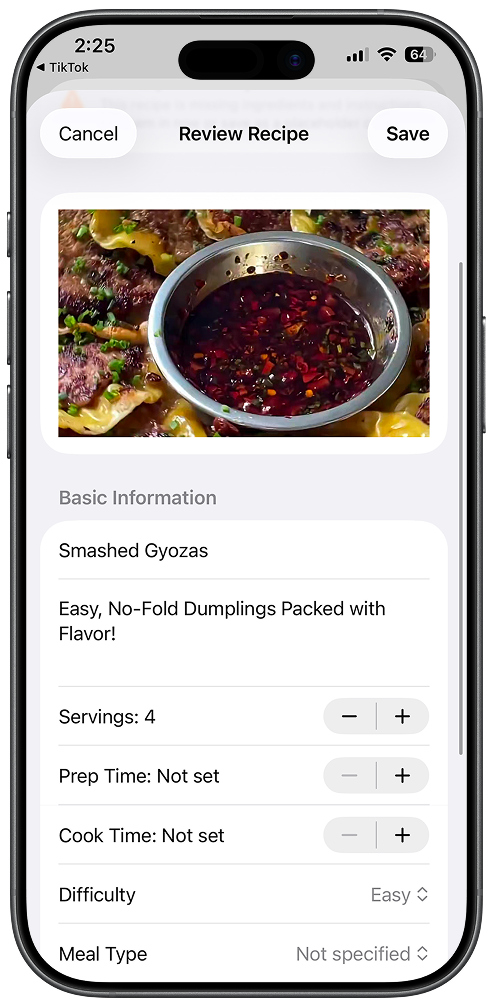
What Gets Extracted From TikTok Videos
When you save a TikTok recipe to Peel, you get more than just a link to the original video. Here's what the app extracts:
- Ingredient list. Review it before cooking, especially when the creator used vague measurements.
- Step-by-step instructions. The recipe is broken into clear, numbered steps you can follow while cooking.
- Measurement conversions. Peel can convert between metric and imperial units as needed.
- Recipe organization. Search by meal type, cuisine, difficulty, or diet after the recipe is in your collection.
What Happens After You Save
This is where saving TikTok recipes with Peel differs from screenshots or TikTok's built-in favorites. Once your recipe is saved, you can actually use it.
Add Ingredients to Your Grocery List
Add the recipes you want to cook to a meal plan, then turn that plan into a grocery list. Peel aggregates quantities across the plan and organizes the list by category.
Add the Recipe to Your Meal Pool
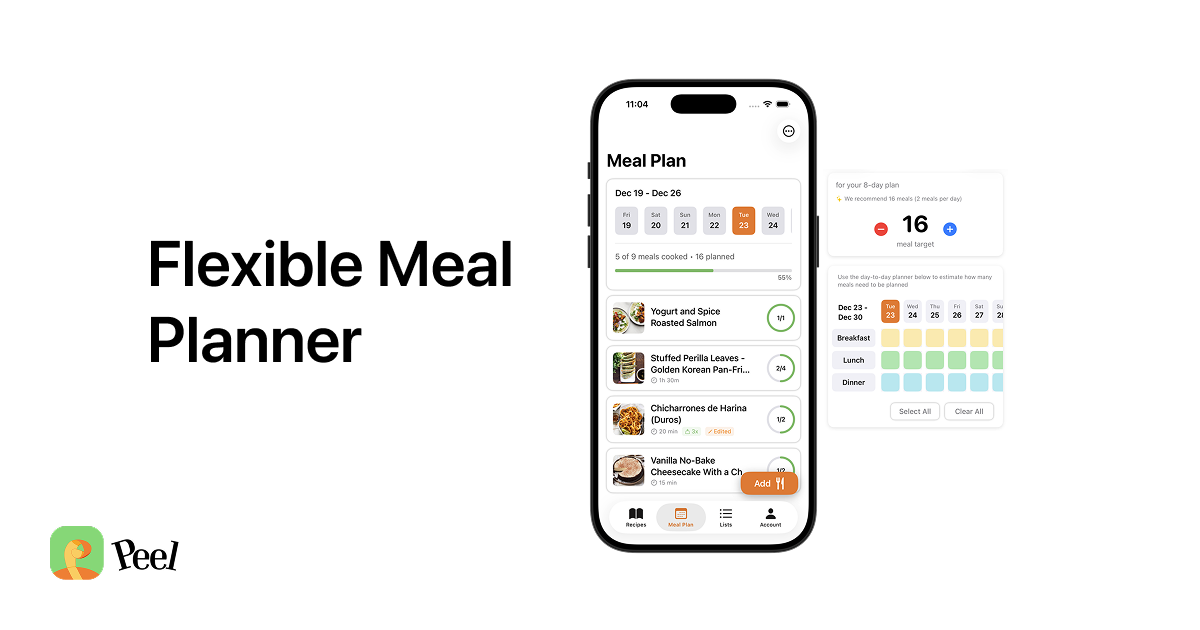
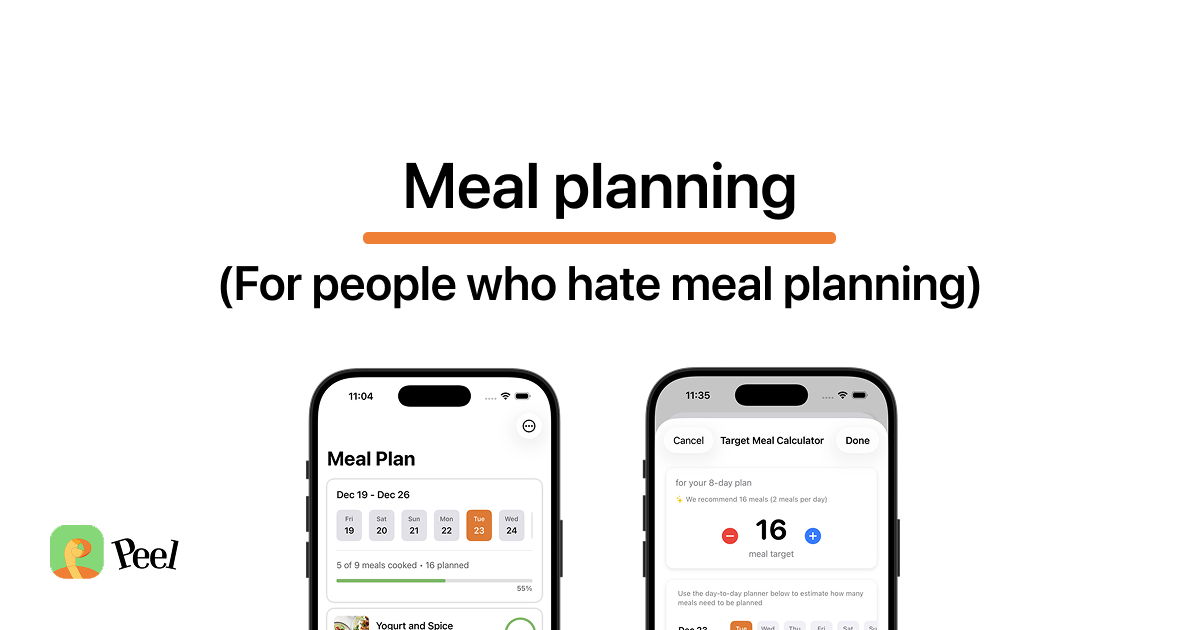
Peel's meal pool lets you plan meals flexibly. Instead of assigning recipes to specific days, you add recipes to a pool for the week and pick what to cook based on your mood each night. Your TikTok recipes can go straight into your weekly rotation.
The best part of Peel, for me, is the meal-planning step. Import recipes from TikTok or Instagram, build a plan from the ones you want to cook, then save a plan you like. You can reuse it as a starting point a few weeks later. Peel turns that finished plan into the grocery list you shop from.
Search Your Collection
Unlike screenshots buried in your camera roll, saved recipes can be organized and filtered by meal type, cuisine, difficulty, or diet.
Share with Your Partner
With Peel Premium, you can share your kitchen with a partner. Both of you see the same recipes, the same meal pool, and the same grocery list, all synced in real time.
Peel v2.0 also added free user-to-user sharing (with an account): you can send any saved recipe to a connection's inbox, and they can save it into their own kitchen. It's useful for TikTok recipes specifically because you save it, try it, love it, and send it to a friend.
Free vs Premium
Peel offers both free and premium options for saving TikTok recipes:
- Free plan: Social-import credits for TikTok, Instagram, and YouTube that refresh every week, plus unlimited recipe imports from websites.
- Premium: Unlimited TikTok, Instagram, and YouTube imports, plus a live shared Kitchen for a partner or household.
The weekly credits let you keep importing social recipes on the free plan. If most of your recipes come from websites, those web imports do not use the social-import allowance.
Also Works With Instagram, YouTube, and Websites
The same recipe extraction technology works across platforms:
- Instagram Reels: Save recipes from Instagram the same way. Share the reel to Peel or paste the link.
- YouTube: Works with YouTube cooking videos and Shorts.
- Recipe websites: Peel can also import recipes from websites, extracting just the recipe from pages cluttered with ads and life stories.
If you've been collecting recipes across multiple platforms, Peel gives you one place to keep them all.
You've Already Found the Recipes
The hardest part of cooking isn't following a recipe. It's deciding what to make. You've already done that work. Your TikTok saves are full of recipes that caught your attention, meals you actually want to try.
Extracting Instagram recipes:
- Open the Reel or post in Instagram.
- Tap the three-dot menu or share icon.
- Select "Share to..." and choose Peel from the share sheet.
- Peel extracts the recipe from the video and any caption text.
Once imported, the recipe lives in your Peel collection, where you can organize it, add it to a plan, and use it to build a grocery list.
Full platform guide: how to save recipes from Instagram Reels on iPhone. Download Peel and start turning your TikTok saves into real dinners. Free accounts get social-import credits that refresh every week.
How to Save YouTube Cooking Recipes
YouTube is the platform most likely to have the full recipe in the video description. Check there first. Many food creators paste the complete ingredient list and steps into the description box below the video. If it's there, copy and paste it directly into Peel.
For videos without a written recipe in the description:
- Tap the Share button below the video.
- Select Peel from the iOS share sheet.
- Peel processes the audio and any on-screen text to extract the recipe.
YouTube Shorts work the same way. Longer videos (15+ minutes) may take slightly longer to process since Peel needs to analyze more content.
Full guide: how to save recipes from YouTube on iPhone.
How to Save Pinterest Recipes
Pinterest recipes are usually handled differently from video platforms. Most Pinterest recipe pins link to a full recipe on an external website. Peel imports from those websites directly:
- Tap the pin to open the full article on the recipe website.
- Tap the Safari share button.
- Select Peel. The app strips the recipe out of the web page, skipping the ads, story, and comments.
Website imports are free on all Peel plans. You can import recipes from recipe websites without a Peel subscription.
Peel also supports Pinterest imports from the iOS share sheet. If a pin opens a recipe website, import the linked page as a free web import.
Full guide: how to save recipes from Pinterest on iPhone.
How to Save Facebook Recipes
Peel's current Facebook support is for posts that contain links to external recipe websites. Native Facebook Reels are not currently extracted as social-video imports.
For a recipe link shared in Facebook, including one posted in a Group:
- Copy the link from the post.
- Open Peel and paste the link into the import field.
- Peel imports the recipe from the external site. Web imports are unlimited on the free plan.
Full guide: how to save recipes from Facebook on iPhone.
Social recipe-saving apps compared
These apps support different combinations of social posts and linked recipe websites. A Facebook recipe link and a native Reel are not the same import:
| Platform | Peel | Flavorish | OrganizEat | ReciMe |
|---|---|---|---|---|
| TikTok | Yes | Yes | Yes | Yes |
| Yes | Yes | Yes | Yes | |
| YouTube | Yes | Yes | Not documented | Yes |
| Pinterest + recipe links | Linked recipe websites | Linked recipe websites | Linked recipe websites | |
| Recipe links | Facebook imports | Facebook posts | Public posts + Reels | |
| Meal planning | Flexible pool + grocery list | Weekly plan + grocery lists | Calendar or weekly shortlist + grocery lists | Weekly calendar + grocery lists |
| Devices | iPhone, iPad | iOS, Android, web | iOS, Android, web | iOS, Android; web recipes |
All four apps offer meal planning and grocery lists. Peel's workflow centers on choosing recipes from your collection for a flexible meal pool, then building a grocery list from that plan. You can decide what to cook without assigning every meal to a particular day. OrganizEat also offers a flexible weekly shortlist; flexibility is not exclusive to Peel.
Capabilities checked against official documentation on September 21, 2026: Flavorish features, OrganizEat's imports and meal planner, and ReciMe's Facebook, YouTube, Pinterest and meal-planning guides. Import results depend on the source post. "Not documented" means we could not verify support in the app's public documentation, not that the feature cannot work. ReciMe's web app lets you view saved recipes; its meal planner is mobile-only.
What Happens After You Save: From Social Media Recipe to Meal Plan
Saving is step one. The more useful question is what happens when you want to cook from the recipes you collected.
Your Collection, Not a Curated Library
Peel does not include a built-in recipe library. That is a deliberate product choice, and it makes Peel a poor fit if you want to browse recipes inside the app. It is built for people who already find recipes on websites and social platforms and want their own collection to be usable.
Peel stores only the recipes you save. Searchable by ingredient, name, or tag. No algorithm surfacing recipes you didn't ask for.
The Meal Pool: Add What Sounds Good, Cook What You Feel Like
Peel's meal pool is the weekly planning layer. Instead of assigning a specific recipe to each day of the week (Monday: pasta, Tuesday: tacos), you add 5 to 7 recipes to a pool and cook whatever sounds good each night. The pool adapts to your mood, your energy level, and what you bought that week. It's the same flexibility most people apply to eating out, applied to cooking at home.
Grocery List Generation
Once you have recipes in your pool, Peel turns the plan into one grocery list that aggregates quantities and organizes ingredients by category. Review the list before you leave for the store, then shop from the same plan you built from your saved recipes.
Partner Kitchen Sharing
Peel Premium includes a live shared Kitchen for a partner, roommate, or household. Everyone in that Kitchen stays in sync on recipes, the meal pool, and the grocery list in real time.
See how Peel compares to other recipe apps for the full collection-to-meal-plan workflow: best recipe import apps for iPhone (2026) and best way to store recipes digitally.
Frequently Asked Questions About Saving Recipes from Social Media
How do you save recipes from social media?
For TikTok, Instagram, YouTube, and Pinterest, tap Share and select Peel from the iOS share sheet. Peel saves the recipe with its ingredients and steps. For Facebook posts that link to a recipe website, open or copy the linked page and import that web recipe into Peel.
What app saves recipes from TikTok?
Peel is an iOS app that turns TikTok cooking videos into structured recipes with ingredients and steps. Free accounts get social-import credits that refresh every week, while Premium includes unlimited social imports.
How do I save Instagram recipes without losing them?
Share the Reel to Peel using the iOS share sheet. Peel saves its recipe information in your collection, where you can organize it and use it in a meal plan instead of searching through Instagram's Saved folder.
Does Peel work with YouTube recipes?
Yes. Tap Share below the YouTube video and select Peel to import its recipe. Free accounts get social-import credits that refresh every week, and Premium includes unlimited social imports.
How do I save recipes from Facebook?
Peel currently supports Facebook posts that contain links to recipe websites. Open or copy the linked recipe page and import it into Peel. Native Facebook Reels are not currently extracted as social-video imports.
What happens if the original social media post gets deleted?
The imported recipe stays in your Peel collection so you can organize it, add it to a meal plan, and turn that plan into a grocery list. Access to the original video or post still depends on the social platform and creator.
Last updated: September 21, 2026