The best free Prepear alternative for iPhone is Peel if your real problem is a plan that keeps falling apart. Prepear pairs a genuine recipe manager with a meal planner, but its reusable and pre-built plans, grocery features, and nutrition sit behind Prepear Gold. Peel comes at meal planning from the other side: you fill a flexible meal pool with options for the week, shop for it, then cook whatever sounds good the day of, instead of committing to a rigid grid. It is free to start, imports from the web and from TikTok, Instagram, and YouTube, and builds your grocery list automatically. The honest catch, up front: Peel is iOS only, and Prepear is cross-platform.
Read enough Prepear reviews and a pattern shows up: people who liked the app but feel recent updates have ruined the experience, pushing Gold harder and burying features they had already invested time in. I read competitor reviews every week while building Peel, and that specific frustration, a planner that changes under you, is exactly the thing a meal pool is meant to fix. If you want the wider field of planners across every style, our 2026 meal planning app guide covers the whole category. This post is narrower: Prepear versus Peel, on iPhone, told straight.
Prepear vs Peel at a glance
Prepear sits in the recipe-manager-plus-planner category, so here is how it lines up against Peel and two other iOS recipe managers people cross-shop, Pestle and RecipeKeeper. Prices and ratings move, so check each App Store listing for current numbers. Prepear Gold pricing below is current as of September 2026.
| App | Recipe & social import | Meal planning model | Built-in library & nutrition | Free tier | Platform |
|---|---|---|---|---|---|
| Peel | Web plus TikTok, Instagram, YouTube (AI extraction) | Flexible meal pool, cook what sounds good | No library, no nutrition | Yes, generous | iOS / iPadOS |
| Prepear | Web saving plus its own recipe community | Pre-built and reusable plans (much behind Gold) | 300k+ community library, built-in nutrition | Free with ads; Gold $119.99/yr | iPhone / iPad / Apple-silicon Mac / Web |
| Pestle | Recipe manager with web import; see App Store | Recipe box with some planning | No large built-in library | Free tier; paid upgrade | iOS |
| RecipeKeeper | Recipe manager with web import; see App Store | Recipe box with some planning | No large built-in library | Free tier; paid upgrade | iOS / Android / Web |
Pestle and RecipeKeeper are solid recipe managers with light planning, and their exact feature and price details are best confirmed on their App Store pages. The interesting contrast is the first two rows. Prepear plans by handing you a plan; Peel plans by handing you a pool. That single difference is what the rest of this post is about.
What Prepear does well
I am not here to knock Prepear. It earns its 4.4-star rating (from around 503 US ratings) for real reasons, and it does several things Peel does not even attempt. Honest credit first:
- A real recipe community library. Prepear ships with a 300k+ recipe library you can browse and save from. Peel has no built-in library at all, you bring your own recipes, so if discovery inside the app matters to you, Prepear wins outright.
- Built-in nutrition. Prepear surfaces nutrition information on recipes. Peel does no nutritional tracking. If calories and macros on every recipe are non-negotiable, stay with Prepear.
- Cross-platform. Prepear is available on iPhone, iPad, Apple-silicon Mac, and the web. Peel is iPhone and iPad only. On sheer reach, this is not close.
- Established and stable as a manager. It is a mature recipe manager and planner with years behind it.
If those four are your core needs, this is a short article for you: keep Prepear. Peel is aimed at a different itch, and the next section is where it earns the switch.
Where Prepear frustrates people
The recurring complaint in reviews is not that Prepear is broken. It is that the pieces people relied on, reusable plans, grocery lists, nutrition, keep landing behind Prepear Gold, which runs $119.99 per year after a 7-day trial. The free tier is ad-supported and limited. When updates push the paywall harder and reshuffle where features live, the experience can feel like it has moved out from under you even though the app still works.
There is also the structural thing underneath the paywall talk. Prepear's planning is built around plans, pre-built ones you slot in, or ones you reuse week to week. That is great until a Thursday event blows up the week and you are staring at a plan that no longer matches your life. When I was building Peel, this is the exact failure mode I wanted to design out, and it is not solved by a cheaper price. It is solved by a different shape.
How Peel is different: a flexible pool, honest free tier, an auto grocery list
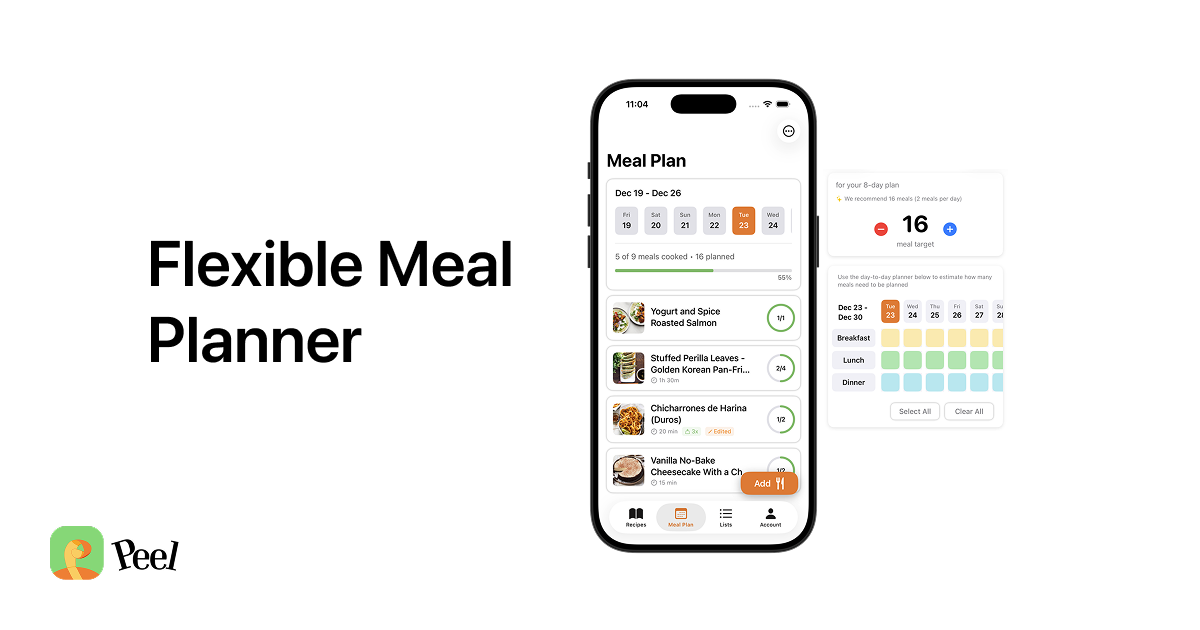
Start with the planning model, because it is the whole point. This is the part I felt personally before I built anything. I would plan meals Monday through Sunday, feel good about it, and then a random Thursday event would come up and the plan would fall apart, and it felt like failure every single week. So I built a pool instead. You estimate how many meals you need, fill the pool with options, shop for it, then choose what to cook the day of. No slot has to be filled. The pool flexes. A calendar, or a pre-built plan, does not. Our flexible meal planning guide walks through the full workflow, and if you specifically want an app that helps surface what to make, this piece on meal planning apps that suggest meals is worth a read.
Next, where the recipes come from. Peel imports from recipe websites and blogs (unlimited and free) and from TikTok, Instagram, and YouTube using AI extraction, so a stir-fry you saved from a Reel lands as a real structured recipe with ingredients and steps, not a bookmark you have to re-parse later. Free accounts get social-import credits that refresh every week, and Premium removes the cap. That weekly refresh matters: your free allowance is not a one-time bucket that empties and stays empty.
On the free-versus-paid split, I made a deliberate choice that runs opposite to the Gold model. The principle is simple: if a feature costs me money to run, I ask users to pay for it; if it does not, I offer it free. Web imports cost almost nothing, so they are free and unlimited. Social imports need AI extraction, which costs money per import, so heavy use is Premium. I did not want to lock basic functionality behind a paywall to inflate perceived value. Unlimited recipe storage, meal-pool planning, and the grocery list are free because they should be.
The grocery list closes the loop. Once your options are in the pool, Peel builds the list automatically from what you actually plan to cook, grouped into store sections. Swap a meal and the list updates without breaking anything, because it is tied to the pool, not to fixed days. There is also a partner kitchen on Premium, where one other person shares your live kitchen, one subscription covers both of you, and you both see the same recipes, pool, and list in real time.
Who should pick which
Here is the decision, stated plainly:
- Choose Prepear if you want a big browsable recipe library inside the app, built-in nutrition on your recipes, or access on Mac or the web. Cross-platform reach and a built-in library are genuine wins, and Peel does not match them.
- Choose Peel if you are on iPhone or iPad, you collect recipes from the web and from TikTok, Instagram, and YouTube, and you are tired of a plan that punishes you when the week changes. The flexible pool, the honest free tier, and the auto grocery list are the reasons to switch.
- If you want cross-platform above all, Prepear wins. No spin on that. Peel is iOS first on purpose, because shipping a great experience on one platform beats a mediocre one on two. Android is coming, but it is not here yet.
If free and flexible is the priority, it is worth comparing Peel against the rest of the no-cost field in our roundup of the best free meal planning apps before you commit.
Frequently asked questions
Is there a free Prepear alternative for iPhone?
Yes. Peel is a free Prepear alternative for iPhone. The free tier includes unlimited recipe storage, unlimited web imports, flexible meal-pool planning, and an auto grocery list, with no account required to start. Social video imports from TikTok, Instagram, and YouTube use import credits that refresh every week on the free plan, and Premium removes the cap. Prepear is also free to download but ad-supported, and much of its reusable planning, grocery, and nutrition functionality sits behind Prepear Gold at $119.99 per year.
Does Peel import recipes like Prepear?
Yes, but from different places. Peel imports from recipe websites and blogs (unlimited and free) and from TikTok, Instagram, and YouTube using AI extraction, so a recipe from a cooking video lands as structured ingredients and steps, not a bookmark. Prepear leans on its own 300k+ recipe community library plus web saving. Peel has no built-in recipe library, you bring your own recipes, so if a giant browsable library matters most to you, Prepear has the edge there.
Is Peel iOS only?
Yes. Peel is iOS and iPadOS only right now. There is no Android app and no web app yet. Android is planned, not never, but we built for iOS first to make the experience excellent before expanding. Prepear is available on iPhone, iPad, Apple-silicon Mac, and the web, so if you need cross-platform reach, Prepear wins on availability.
Does Peel show nutrition info like Prepear?
No. Peel does not do nutritional tracking. Prepear includes built-in nutrition information, so if calorie and macro data on every recipe is a must-have, that is a real reason to stay with Prepear. Peel focuses on collecting recipes from anywhere, planning them from a flexible pool, and building the grocery list, not on nutrition analysis.
If you came here from Prepear because the plan keeps falling apart or Gold keeps getting in the way, Peel is free to try. Import a few recipes from your favorite creators, build a pool, and let the grocery list write itself.
Published September 2026. Prepear plan pricing, ratings, and feature availability current as of September 2026; check the App Store listing for exact details. Peel is iOS and iPadOS only.