The best iPad meal planning app depends on how you cook: Peel suits a flexible week built from your own saved recipes. Paprika, Crouton, AnyList and MealBoard also support iPad, with different strengths in calendar planning, cooking tools and shopping. Start with the comparison below, then try a real recipe on the iPad you use in the kitchen.
I built Peel, so this is a founder's comparison, based on the apps' published features. It is not a hands-on iPad benchmark. For a wider platform comparison, see our meal planning app guide.
The best iPad meal planning apps compared
| App | Why consider it on iPad? | Main decision |
|---|---|---|
| Peel | Bigger-screen layouts, flexible meal pool, automatic grocery list | Free core planning; Premium for partner kitchen sharing |
| Paprika | Web recipe collection, weekly or monthly plans, cooking timers | Paid app; other platform versions sold separately |
| Crouton | Weekly planner, recipe scanning, step-by-step cooking | Free download with in-app purchases; Apple devices |
| AnyList | Calendar or undated Queue, Ideas and reusable Templates, connected to shared lists | Meal planning and web access require Complete |
| MealBoard | Meal plans, grocery lists and pantry inventory | Useful if you want to maintain stock quantities |
Feature sources checked September 16, 2026: Paprika, Crouton, AnyList Complete and MealBoard. These are workflow recommendations, not measured layout rankings.
What to check on your own iPad
A kitchen iPad has two different jobs: helping you decide what to cook and showing the recipe while you cook it. An app can be good at one and awkward at the other. Before moving your collection, use one familiar recipe to check these four things:
- Reading at your cooking distance. Put the iPad where it will actually sit. Open a recipe with a long ingredient list and several steps. Check whether you can read quantities without leaning over the counter.
- Switching between ingredients and steps. Try portrait and landscape. Notice whether you lose your place when checking an amount. A particular column layout matters less than being able to follow your recipe.
- Planning and shopping. Add two recipes with a shared ingredient, then inspect the grocery list. Review quantities and units, and remove what you already have before shopping.
- Your other device. If you shop from a phone, verify the same list is available there with your intended account or sharing setup. If multitasking matters, try it on your exact iPad and operating-system version before relying on it.
This is a suggested evaluation checklist, not a report of tests completed for this article. None of the recommendations below promises Split View, Stage Manager or readability from across a room.
Peel: a flexible meal pool on the bigger screen
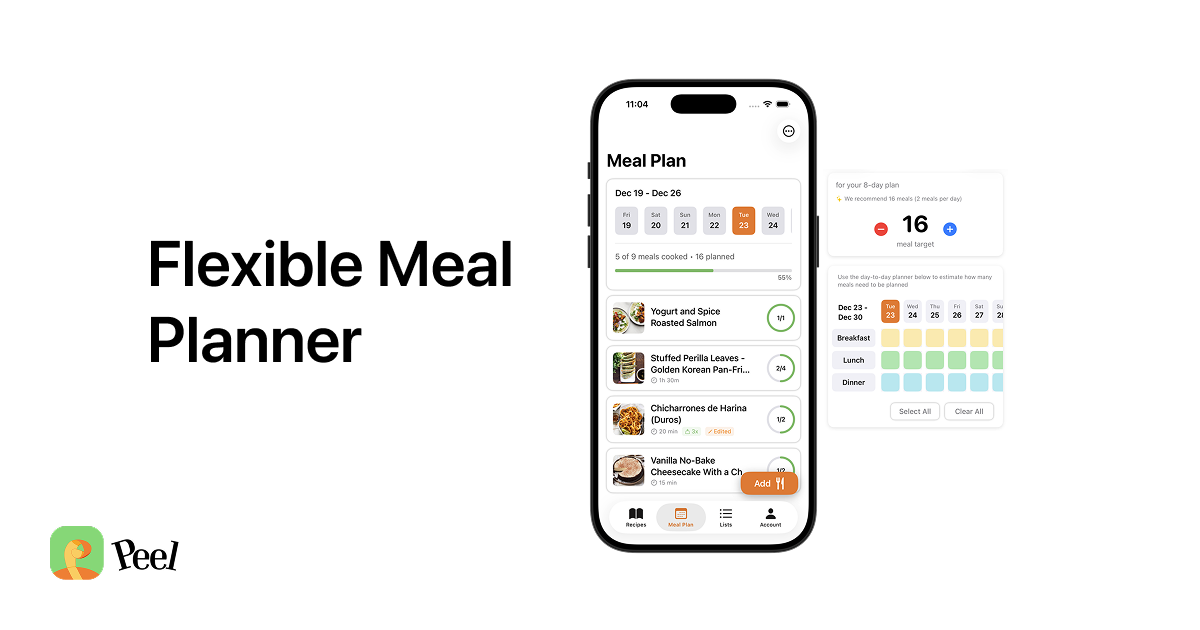
Peel has layouts designed for iPad's bigger screen. You bring recipes into your collection, choose a pool of meals, and turn the plan into a grocery list that combines quantities and groups items by category. Home Screen widgets show your meal plan and grocery list at a glance.
Recipe sources matter as much as screen size. Peel imports from websites, TikTok, Instagram, YouTube and Pinterest. Web imports and recipe storage are unlimited on the free tier; social imports use credits that refresh every week, with unlimited social imports on Premium. Our TikTok recipe-saving guide explains that part of the workflow.
I used to plan meals Monday through Sunday, then an unexpected evening out would knock the week off course. That is why I built a meal pool: choose the meals, shop for them, and decide what to cook on the day. The iPad's role in that approach is to make the available choices easy to consult when it is time for dinner.
A four-dinner example for a kitchen iPad
Here is a suggested setup based on that planning approach. Suppose you expect to cook four dinners: lentil soup, chicken wraps, a pasta dish and vegetable fried rice. Add those recipes to one meal plan and generate the combined grocery list. Check the fridge and cupboards before you buy anything.
Keep the meal plan available on the kitchen iPad. On a busy evening, choose the fastest option; when you have more time, cook the soup. If an evening out replaces dinner at home, review which ingredients need using first and adjust the remaining meals. A flexible plan still needs that judgment. It cannot guarantee that food will never be wasted.
After the week, save the plan as a reusable template if the combination worked. That turns the iPad into a place to revisit household meals, rather than a calendar you must rebuild every Sunday. Our flexible meal planning guide covers the method in more detail.
Where the other iPad apps fit better
Paprika: a recipe collection with calendar planning
Paprika combines web imports, grocery lists and weekly or monthly meal plans. Cooking tools include timers, ingredient scaling and highlighting the current instruction. It is worth considering if you prefer assigning meals to dates and want versions for other platforms; each platform version is sold separately. That is a different purchase model from a subscription.
Crouton: cooking tools across Apple devices
Crouton supports iPad alongside other Apple devices. It documents web imports, cookbook scanning, weekly planning, iCloud sync and plans generated from saved recipes. Its developer also describes step-by-step cooking and hands-free navigation. Those are useful reasons to try it if following a recipe at the counter matters most. It is a free download with in-app purchases; check the available upgrades for the features you want.
AnyList: dated or undated planning with shared lists
AnyList Complete includes calendar and list views for meal planning, recipe web imports and browser access. Its January 2026 planning update also added an undated Queue for recipes you want to cook soon, an Ideas tab with suggestions from your collection, and Templates for reusing plans. You can add ingredients for upcoming recipes to your shopping list. Choose it if a shared list is already central to your household and you want either scheduled meals or an undated group of options. These meal-planning features require Complete.
MealBoard: pantry inventory alongside the plan
MealBoard supports web recipe imports, cookbook scanning, meal scheduling, prep reminders and grocery lists. Its pantry inventory lets you track stock and adjust it as you cook; its web app supports recipe and meal-plan management. Consider it if inventory is the missing part of your kitchen setup and you are willing to keep it updated. That is a more useful distinction than dismissing its interface based on appearance.
Choosing for a shared kitchen
I wanted a kitchen my wife and I could keep building together over years. That is also why one Peel Premium subscription covers both partners in a shared kitchen. Recipes, the meal pool and the grocery list stay in sync between the two people.
Peel's free tier includes meal planning and grocery lists, but live partner kitchen sharing requires Premium. Peel has no Android or web app, and it does not provide a browsable recipe catalog or nutritional tracking. For two people using iPhone or iPad who want to plan from their own collection, it is a good starting point. If browser access or pantry inventory is essential, the alternatives above may fit better.
For more on the household decision, see our meal planning apps for couples comparison. If seeing dinner without opening the app is the main appeal, our widget guide covers that feature.
Frequently asked questions
What is the best iPad meal planner in 2026?
Peel is a good fit for flexible planning with recipes saved from websites and social media. Paprika suits a recipe collection with calendar planning, Crouton offers cooking tools across Apple devices, AnyList connects a planning calendar and undated recipe queue to shared lists, and MealBoard adds pantry inventory. Choose based on your workflow and the devices your household uses.
Is there an iPad recipe app that reads well on the bigger screen?
Peel has layouts designed for the bigger screen, and the other four apps in this comparison also support iPad. Readability depends on your device, orientation and text settings. Open a long recipe on your own iPad before committing; iPad availability alone does not establish Split View or Stage Manager support.
What is the best meal planning app for iPad if I cook as a family?
Start with the devices used by the people who plan and shop. For two people using iPhone or iPad, Peel Premium partner kitchen sharing keeps recipes, the meal pool and the grocery list in sync, with one subscription covering both partners. If someone needs a browser, compare AnyList Complete or MealBoard, which document web access.
Is there a free recipe app for iPad that also plans meals and makes a grocery list?
Peel includes unlimited recipe storage, web imports, flexible meal planning and automatic grocery lists on its free tier. Social imports use credits that refresh every week; Premium makes those imports unlimited and includes partner kitchen sharing. Peel has no Android or web app.
Published August 14, 2026. Last updated September 16, 2026.